

Quick Summary
Rack smoke sensors and door sensors protect server rooms by giving early fire warning and recording cabinet access. Options include the APC smoke detector at AUD 445.92, the Eaton smoke sensor at AUD 76.54, and door sensors from AUD 43.74. Choose by where you need coverage: inside the cabinet, at room level, or on doors.
- Point sensors inside cabinets catch faults at the source, while room-level sensors cover the wider floor.
- Aspirating smoke detection samples air continuously and can warn earlier, but it needs professional design and commissioning.
- Door sensors monitor cabinet access and can be used on room doors or third-party racks.
- Test each sensor on a routine schedule and log the results, not only at commissioning.
- Rack sensors supplement the building fire detection system and do not replace it.
Table of Contents
- Why Rack Smoke and Door Sensors Matter in Server Rooms
- Server Room Smoke Detector Options and Where Each Fits
- Aspirating Smoke Detection for Server Rooms: When It Is Worth the Step Up
- Networkable Rack Door Sensor Options and What They Monitor
- Side-by-Side Comparison of Smoke and Door Sensor Options
- Building a Server Rack Monitoring System That Alerts You in Time
- Installing, Testing and Maintaining Your Rack Sensors
- Speaking to Treske About Your Rack Sensor Setup
- Frequently Asked Questions
Server rooms run on uninterrupted power, but a single undetected smoke event or an unlatched rack door can take down critical services in minutes. Treske Pty Limited designs and maintains critical infrastructure, and rack smoke sensors and door sensors are among the lower-cost ways to protect that investment. This guide explains the main options, where each one fits, and how to build a monitoring setup that gives your team time to respond.
Why Rack Smoke and Door Sensors Matter in Server Rooms
Smoke sensors give early warning of a fire, while door sensors record who opens a cabinet and when. Together they close two gaps that building-level systems often miss: a fault confined inside a rack, and unauthorised or unnoticed access to equipment.
Server Room Smoke Detector Options and Where Each Fits
For smoke detection inside IT spaces, the APC by Schneider Electric Smoke Detector (AUD 445.92) is a universal sensor designed to supplement an existing life safety system. It connects to compatible NetBotz appliances over standard CAT5/6 cable, and the package includes rack mounting brackets.
The Eaton Smoke Sensor (FLXTSMOS) at AUD 76.54 is designed for continuous smoke detection inside the cabinet. Choose it when you want detection at the rack level rather than the room level.
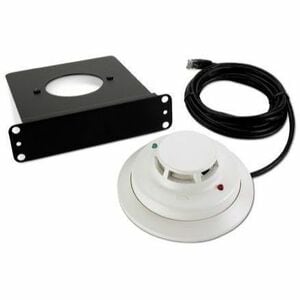
Match the sensor to the space. A sensor inside a cabinet catches a fault at its source, while a room-level sensor covers the wider floor. Many facilities use both.
Aspirating Smoke Detection for Server Rooms: When It Is Worth the Step Up
Standard point detectors wait for smoke to reach them. Aspirating smoke detection (ASD), also called very-early warning smoke detection (VESDA is one common brand family), continuously draws air from the protected space through a network of pipes to a central detector. Because it samples air rather than waiting for smoke to arrive, it can flag particles at concentrations well below the threshold of a point detector, which suits high-value rooms where minutes of warning matter.
How it differs from point detection in practice
- Sensitivity: ASD can be configured to alert at very low obscuration levels, giving earlier warning than a standard photoelectric point detector. That earlier warning is only useful if your team has a response plan for it.
- Coverage: One ASD detector can serve multiple sampling points across a room or a row of cabinets, whereas point detectors need one unit per protected area.
- Maintenance: ASD needs periodic pipe inspection, filter changes and detector calibration. Point detectors need cleaning and replacement on the manufacturer's schedule. Neither is maintenance-free.
- Cost and complexity: ASD requires design, pipe balancing and commissioning by a qualified fire-protection professional. Point sensors are simpler to install and replace.
When the step up is justified
A common pattern is to reserve ASD for rooms where a fire would halt a revenue or safety-critical service, where the room has high airflow or ceiling height that makes point detection slow to respond, or where the equipment value is high enough that early warning changes the outcome. For a small room with a few racks, point sensors inside the cabinets and at room level are usually sufficient and far easier to maintain.
System boundaries and compliance
Rack-level and room-level detection complements, and does not replace, the building fire detection system. If your insurer or certifier has requirements, involve them early.
Watch out: An ASD system that is designed without pipe balancing or commissioning can produce nuisance alarms or miss a fire altogether, so do not treat it as a plug-in upgrade to a point-sensor setup.
Networkable Rack Door Sensor Options and What They Monitor
Door sensors tell you when a cabinet opens, which matters for both security and change control. The APC NetBotz Door Switch Sensor for Rooms or 3rd Party Racks, 50 ft. (AUD 119.04) connects to compatible NetBotz appliances and can be used on room doors or third-party racks.
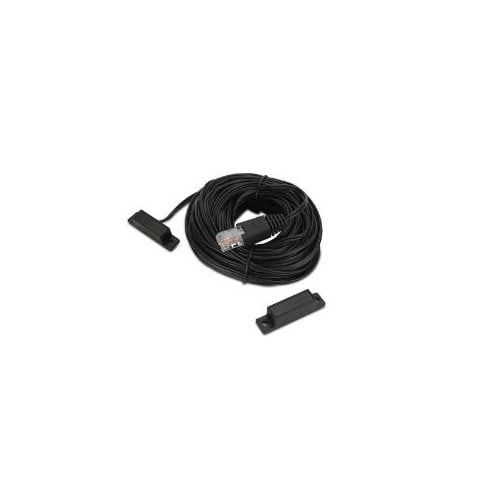

The Eaton Door Status Sensor (AUD 43.74) monitors door status in real time and triggers alerts to enhance security.
The APC by Schneider Electric Door Sensor (AUD 95.52) is listed as a Door Sensor with compatibility for NetBotz 250A and 750 appliances.
Check how each sensor reports before buying. Some feed a monitoring appliance, while others need their own integration.
Side-by-Side Comparison of Smoke and Door Sensor Options
| Product | Type | Starting Price (AUD) | Connects To | Best For |
|---|---|---|---|---|
| APC by Schneider Electric Smoke Detector | Smoke | 445.92 | NetBotz appliances | Room-level smoke detection in IT spaces |
| Eaton Smoke Sensor (FLXTSMOS) | Smoke | 76.54 | Eaton PDU ecosystem | Detection inside the cabinet |
| APC NetBotz Door Switch Sensor, 50 ft. | Door | 119.04 | NetBotz appliances | Room doors and third-party racks |
| Eaton Door Status Sensor | Door | 43.74 | Monitoring system | Low-cost real-time door alerts |
| APC by Schneider Electric Door Sensor | Door | 95.52 | NetBotz appliances | Door monitoring within a NetBotz setup |
Starting Price (AUD)
Building a Server Rack Monitoring System That Alerts You in Time
A sensor is only useful if its alert reaches someone who can act. Start by deciding who receives each alarm, how quickly, and what they do next. Connect smoke and door sensors to a monitoring appliance that sends notifications by email or SMS, and test that the alerts arrive outside working hours.
Keep the monitoring system separate from the sensors where possible, so a single fault does not disable both. Treske Pty Limited recommends reviewing a monitoring setup alongside the cooling and power plan. If you are also reviewing your power resilience, our UPS Installation service can be assessed alongside the monitoring plan.
Installing, Testing and Maintaining Your Rack Sensors
Installation and maintenance decide whether a sensor works when it matters. The guidance below covers the practical steps competitors tend to skip.
Mounting and alignment
Mount smoke sensors where airflow carries smoke to them, typically near the top of the cabinet or in the exhaust path, and follow the manufacturer's clearance distances from obstructions. For door sensors, align the magnet and reed switch so the contact closes cleanly when the door shuts; a gap of more than a few millimetres is a common cause of missed events. Route sensor cables away from power runs to limit interference, and label each sensor to its rack and port.
False alarms and nuisance triggers
Dust, humidity, insect ingress and airflow patterns are the usual causes of nuisance smoke alarms in IT spaces. Clean smoke sensors on the manufacturer's schedule, seal cable entries, and avoid mounting directly in front of a cooling unit's discharge. For door sensors, a loose hinge or a rack that flexes can cause intermittent open/closed events; check the contact alignment after any rack work.
Testing schedule
Test each sensor on a routine schedule, not only at commissioning. Trigger the smoke sensor with approved test smoke or the manufacturer's test method, and open the door to confirm the alert reaches the right people. Record the test date, the person who performed it and the result. A simple log helps when you review incidents, respond to an audit, or hand the site to a new team. For a formal check of the whole installation, a Site Acceptance Testing (SAT) review can confirm that sensors and alerts perform as designed.
Maintenance and replacement
Replace smoke sensor units and batteries as the manufacturer advises, and keep spare door contacts on hand because they are inexpensive and fail silently. Check that monitoring appliance firmware and alert routing are current after any change to the network or the on-call roster.
Compliance boundaries
Rack sensors are supplementary monitoring, not a substitute for the building fire detection system. Building fire systems are designed, installed and maintained under Australian standards and generally require a qualified fire-protection professional. Confirm with your certifier or insurer whether rack-level alerts need to be integrated into the building fire indicator panel or kept as a separate monitoring system.
Watch out: A door sensor that is never tested can fail silently, leaving a cabinet unmonitored for months without anyone noticing.
Speaking to Treske About Your Rack Sensor Setup
Choosing the right smoke and door sensors depends on your room size, rack layout, existing NetBotz or Eaton hardware and how quickly your team must respond. Treske Pty Limited can review your environment and install and commission sensors with in-house field technicians. If you are relocating equipment as part of a wider upgrade, our Relocation Services can help plan the move around the sensor layout. You can also explore our APC by Schneider Electric Smoke Detector and Eaton Door Status Sensor to see what each one offers before you talk to us.
Frequently Asked Questions
What types of smoke sensors can be used in a server rack?
Server racks commonly use photoelectric smoke sensors, such as the APC by Schneider Electric Smoke Detector at $445.92 and the Eaton Smoke Sensor (FLXTSMOS) at $76.54. Both are designed to sit inside IT spaces and supplement the building's existing life safety system rather than replace it. Choose a sensor that is compatible with your monitoring appliance, check the cable length you need for your cabinet layout, and confirm the installation with your building fire engineer before fitting it.
Can a smoke detector be installed inside a server cabinet?
Yes. Rack-mounted smoke sensors such as the APC by Schneider Electric Smoke Detector include mounting brackets and cable ties, so they can be fixed inside the cabinet where smoke may first build up. The sensor connects to a compatible monitoring appliance over RJ-45 cabling, with a 10 ft cable length in the listed model. Placement should be confirmed against airflow and the building's fire design, and any change to the fire alarm system should be coordinated with your fire protection contractor.
Can rack smoke and door sensors send alerts over a network?
Networked sensors can, provided they connect to a compatible monitoring appliance. The APC NetBotz Door Switch Sensor for Rooms or 3rd Party Racks - 50 ft. ($119.04) and the APC by Schneider Electric Door Sensor ($95.52) are listed for compatible NetBotz appliances, and the Eaton Door Status Sensor ($43.74) is designed to monitor door status in real time and trigger alerts. Confirm the appliance and firmware compatibility before purchase.
