

Last Updated: November 18, 2026
Quick Summary
Aisle containment cuts data centre cooling costs by physically separating cold supply air from hot server exhaust so the two never mix. This stops cold air short-circuiting, lets cooling units receive warmer return air and run more efficiently, and allows supply temperatures to rise without risking equipment.
- Cold aisle containment seals the cold supply corridor and is often the easier retrofit where overhead pipework obstructs the ceiling.
- Hot aisle containment captures exhaust at the source and suits facilities where the cold aisle must stay open for access.
- Containment roof panels must sit flush and seal against rack tops, and cable entries, door frames and cabinet gaps must be sealed.
- Fitting EziBlank blanking panels closes empty rack units that would otherwise let cold air bypass the servers.
- Baseline rack inlet temperatures, airflow and bypass, cooling energy and PUE before buying hardware, using two to four weeks of data.
Table of Contents
- Why Aisle Containment Belongs in Every Cooling Strategy
- How Aisle Containment Stops Hot and Cold Air Mixing
- Hot Aisle vs Cold Aisle Containment: Which Fits Your Facility
- Data Centre Aisle Containment Design: Layout, Ceiling Panels and Leakage
- How Containment Lifts Data Centre Cooling Efficiency and Energy Savings
- Eliminating Data Centre Hot Spots Before They Threaten Uptime
- Costs, Payback and What Containment Really Delivers
- Planning Your Containment Retrofit with Treske
- Frequently Asked Questions
Why Aisle Containment Belongs in Every Cooling Strategy
Aisle containment is the practice of physically separating a data centre's cold air supply from hot server exhaust so the two never mix. It belongs in every cooling strategy because mixing is where most cooling energy is quietly lost.
At Treske Pty Limited, we design and install containment systems for facilities where downtime is not an option.
Below, we show how containment works, how to choose between hot and cold aisle designs, and what it really costs.
How Aisle Containment Stops Hot and Cold Air Mixing
The mechanism is simple: build a barrier, then let physics do the rest. Cold air stays in the cold aisle and feeds server inlets.
Without that barrier, cold supply air short-circuits. It escapes over the top of racks or through gaps, then gets pulled straight back into the return.
Research on hot and cold aisle containment and its effect on data centre cooling describes containment as a way to deliver cold air to server inlets while keeping exhaust air separate.
Three things change once the barrier is in place:
- Supply air reaches the rack face instead of leaking away
- Return air stays warm, so cooling units run more efficiently
- Rack inlet temperatures even out across the room
Hot Aisle vs Cold Aisle Containment: Which Fits Your Facility
The choice between hot aisle and cold aisle containment comes down to your floor layout, airflow design and how much disruption you can tolerate.
Cold aisle containment seals the cold aisle itself. Technicians work inside a cooled, enclosed corridor.
Hot aisle containment seals the hot aisle instead, capturing exhaust at the source.
For a deeper side-by-side breakdown, see our guide to Cold Aisle Hot Aisle Containment Systems.
Factor |
Cold Aisle Containment |
Hot Aisle Containment |
|---|---|---|
What is sealed |
Cold supply corridor |
Hot exhaust corridor |
Retrofit difficulty |
Often easier with overhead obstructions |
Depends on ceiling and return path |
Technician comfort |
Works inside cooled aisle |
Works in ambient room air |
Best suited to |
Raised-floor plenum designs |
Open cold aisle requirements |
A Practical Selection Framework
Rather than choosing on preference, work through four questions in order. Each one narrows the decision before you spend anything on hardware.
1. What is your cooling delivery method? With a raised-floor plenum supplying air through perforated tiles, cold aisle containment usually aligns with the existing airflow path.
2. What is your rack density profile? Low-to-moderate density rows tolerate either approach.
**3.
4. What can your ceiling and structure support? Roof panels need a reliable fixing point.
Cold Aisle Containment
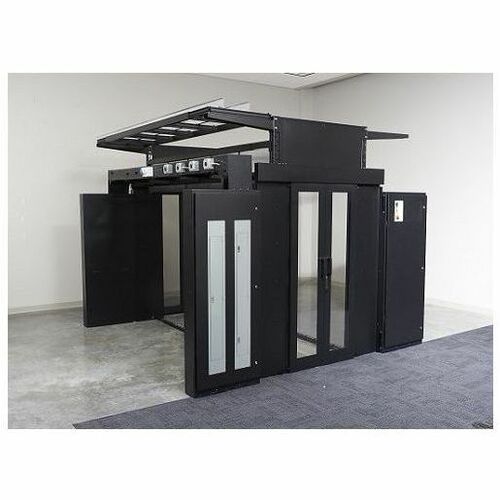
Cold aisle containment encloses the row of rack fronts where cold air enters. Doors and roof panels seal the corridor, so supply air cannot escape before it reaches the servers.
Server inlets get consistent cold air, and hot spots along the row flatten out. The trade-off is access: anyone working inside the aisle is in a cooled, enclosed space, which affects how you plan maintenance.
Hot Aisle Containment
Hot aisle containment does the reverse. It captures hot exhaust at the rear of the racks and ducts it back to the cooling unit.
This keeps the cold aisle open and unrestricted, and concentrating heat in one place makes heat removal more predictable.
Watch out: choosing hot aisle containment without confirming that the return path can actually carry the captured exhaust is a common selection error.
Data Centre Aisle Containment Design: Layout, Ceiling Panels and Leakage
Design quality decides whether containment delivers or disappoints.
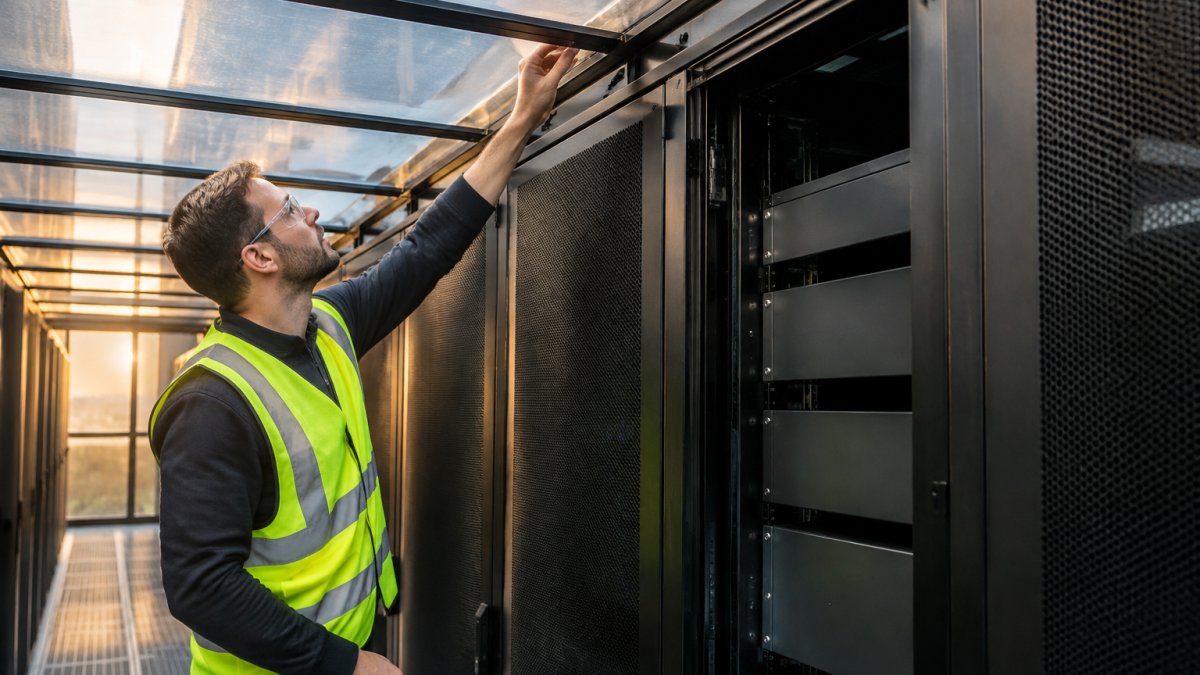
Start with the ceiling. Containment roof panels must sit flush and seal against the rack tops.
Next, deal with leakage. Cable entries, door frames and gaps between cabinets all leak. Seal them.
Then look at the racks themselves. Fitting EziBlank blanking panels closes those gaps and keeps cold air where it belongs.
For a practical walkthrough of sealing and leakage control around racks, read our rack enclosure airflow management guide.
Watch out: fitting containment without first sealing cable penetrations is a common mistake.
How Containment Lifts Data Centre Cooling Efficiency and Energy Savings
Containment improves cooling efficiency by letting you raise supply air temperatures without risking equipment. Warmer supply air means the cooling unit works less to produce the same result.
That is where the energy savings come from: when cold and hot air stop mixing, the cooling unit receives warmer return air and operates more effectively. You are not cooling the same air twice.
A wider set of tactics sits alongside containment: sealing the room, managing rack density and reviewing cooling setpoints. Our guide to server room cooling efficiency covers seven practical ways to cut energy bills. Our guide to server room cooling efficiency covers seven practical ways to cut energy bills.
Savings depend on your starting point. A facility with severe air mixing has more to gain than one already well sealed.
Eliminating Data Centre Hot Spots Before They Threaten Uptime
Hot spots are local temperature spikes that put your most heavily loaded equipment at risk. They form where cold air fails to reach a rack inlet.
Containment attacks the cause rather than the symptom, delivering cold air consistently to every rack face and evening out temperatures along the row.
But containment alone will not fix every hot spot. Two other factors matter:
- Rack density: a fully loaded cabinet needs more airflow than a half-empty one
- Blanking: open rack units let cold air bypass the servers entirely
Hardware life and uptime both depend on stable inlet temperatures. A rack running consistently warm ages faster and fails sooner.
Costs, Payback and What Containment Really Delivers
Containment payback comes from reduced cooling energy, but it varies by site. A savings figure should only be set after assessing your facility; the numbers should be built from your own baseline so you can test any proposal against it.
Your costs fall into four buckets:
- Design and survey: understanding your airflow before you buy anything
- Hardware: doors, roof panels, blanking panels and seals
- Installation: often staged outside production hours
- Commissioning and verification: proving the system actually works
The payback case rests on measurement. Baseline your cooling energy consumption, install containment, then compare. Without a baseline, you cannot prove savings to anyone.
For a structured way to evaluate the spend, see our data centre cooling upgrade cost analysis.
Building a Baseline Before You Buy
A credible payback case starts with four measurements taken before any hardware arrives. Two to four weeks of data is usually enough, provided the period captures both normal operation and peak-load days.
- Rack inlet temperatures: log them at the top, middle and bottom of representative racks in each row to show where hot spots already exist and give a before-and-after comparison.
- Airflow and bypass: measure supply airflow at the perforated tiles or diffusers against the airflow the racks actually draw; the difference is bypass and leakage.
- Cooling energy: record the cooling units' power draw over the same period, ideally at half-hourly intervals to separate base load from peak.
- PUE: calculate power usage effectiveness from total facility power divided by IT power, blunt on its own, but the number most stakeholders recognise.
What Drives the Payback
The savings do not come from containment as a physical product. They come from what containment lets you change:
- Higher supply air temperature: once cold and hot air stop mixing, you can often raise the supply setpoint without risking equipment, reducing the cooling unit's work.
- Longer free-cooling hours: warmer return air and higher supply temperatures can extend the hours per year when outside air or economiser operation is viable.
- Fan energy: sealing bypass reduces the air volume cooling units must move, which can allow fan speeds to drop.
- Deferred capacity: containment can free stranded cooling capacity, delaying or avoiding additional cooling units.
A common pattern is that facilities with severe air mixing see the largest proportional gains, while already well-sealed rooms see modest ones. That is why a site-specific baseline matters more than any generic percentage.
A Worked Example Structure
We will not invent a dollar figure for your site, but the structure of a payback calculation is consistent. Multiply your measured annual cooling energy in kWh by your effective electricity tariff in AUD per kWh for your annual cooling cost.
Two cautions: use your effective tariff, including demand charges where they apply, not the headline rate; and treat any saving estimate not tied to your own baseline as a marketing number, not a financial one.
Measurement and Verification After Installation
Commissioning proves the system works on day one. Measurement and verification proves it keeps working. Repeat the same four baseline measurements after installation and compare like with like:
- Rack inlet temperatures should be more consistent across each row, with the spread between hottest and coolest inlet reduced.
- Bypass and leakage should fall, shown by supply airflow moving closer to rack demand.
- Cooling energy should drop at the same IT load, or IT load should rise at the same cooling energy.
- PUE should improve, though the size of the improvement depends on how much of total facility power is cooling.
Watch out: comparing post-installation readings taken during a cool week against a baseline taken during a heatwave will flatter the result. Match the comparison periods for season and IT load, or the numbers will not survive scrutiny.
Planning Your Containment Retrofit with Treske
A retrofit succeeds when it is planned around your operations, not around a product catalogue.
Treske Pty Limited takes an agnostic approach to critical infrastructure, not tied to a single product line, so the recommendation follows your facility.
We also supply DCIM-class monitoring tools such as EkkoSense data centre optimisation software, which gives you real-time visibility of thermal and power conditions so you can verify results.
Before you commit to any provider, ask for case studies and client testimonials. When you are ready to discuss a retrofit, contact our team.
Cooling costs rarely fall on their own.
Frequently Asked Questions
What is aisle containment in a data centre?
Aisle containment is a physical barrier system that separates the cold air feeding server racks from the hot exhaust air leaving them. It typically uses ceiling panels, end doors and blanking panels to enclose either the cold aisle or the hot aisle. By stopping the two air streams from mixing, containment lets cooling units supply air at a higher temperature while still meeting server inlet requirements, which reduces cooling energy use and evens out rack temperatures.
Does aisle containment actually reduce data centre energy use?
Hot and cold aisle containment is widely regarded as a thermal management strategy. It allows higher cold-air supply temperatures and warmer return air to the cooling unit, both of which can reduce the work the cooling plant must do. The exact savings depend on your baseline, rack density and how well leakage is sealed, which is why measurement after commissioning matters as much as the containment itself.
How do you choose between hot aisle and cold aisle containment?
The right choice depends on your airflow configuration and building layout. Cold aisle containment is typically easier to retrofit where overhead obstructions exist, and it has an advantage in raised-floor plenum environments. Hot aisle containment suits other conditions, particularly where you want to capture exhaust air for return to the cooling unit. Site surveys, rack layout and ceiling height should decide it, not a generic rule of thumb.
Can aisle containment be retrofitted into an existing data centre?
Yes, and retrofits are common. Cold aisle containment is generally easier to retrofit where overhead obstructions are present. A practical retrofit starts with a site survey and airflow assessment, then adds ceiling panels, doors and blanking panels such as EziBlank 1RU panels to close open rack units. Commissioning and verification should follow, so you can confirm the containment is delivering the temperature consistency and energy savings you planned for.
